

Best 10 AI Prompts for Expressive Claymation Style Animations
Claymation has a handmade charm that digital renders often miss, and this collection of ten AI prompts leans into that tactile, expressive look. Instead of tiny plasticine figures on a kitchen table, the prompts imagine whole floating civilizations built from clay-like materials, glowing softly under cinematic skies. The result is a set of worlds that feel both monumental and touchable at the same time.
Each prompt in this set shares a similar visual language: translucent surfaces, luxury architecture, reflective waterways, and a sense of scale that dwarfs the viewer. Whether you generate a jellyfish carrying a city, a compass world split into four realities, or a mechanical flower opening into districts, the claymation treatment gives every structure a slightly imperfect, hand-sculpted surface. This article walks through what the prompts ask for, how to adapt them, and where the common pitfalls hide.
What this claymation prompt collection is asking for
The collection is a set of ten separate scene descriptions, each one building an enormous luxury environment with claymation styling applied on top. The prompts do not name claymation directly in every line, but the shared aesthetic of soft illumination, translucent materials, and sculpted architecture points toward a stop-motion look. The goal is to make impossible floating worlds feel like they were built by hand from clay, resin, and glowing gel.
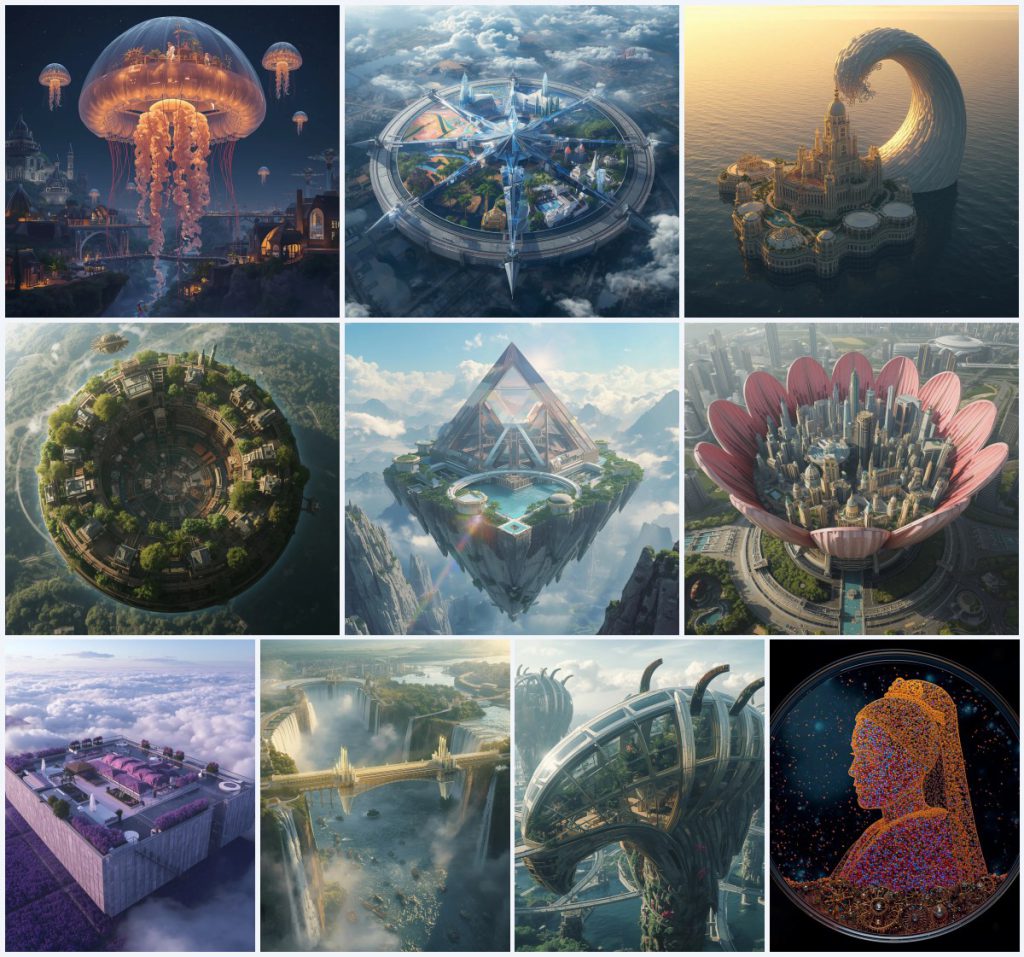
- A gigantic translucent jellyfish floating through the night sky with a luxury civilization beneath its glowing canopy.
- A colossal compass-shaped world divided into futuristic skylines, botanical paradises, crystal kingdoms, and abstract landscapes.
- A kingdom shaped like a giant silk wave drifting across endless reflective seas under golden sunset light.
- A miniature planet covered in circular libraries with orbiting knowledge districts and crystal pathways.
- A prism-shaped mountain splitting sunlight into architectural rainbows above reflective waters.
- A mechanical flower opening each morning to reveal city districts, towers, and crystal waterways inside its petals.
The shared scene across all ten floating worlds
Every prompt in this collection describes a vast, self-contained environment where architecture and natural forms merge. The jellyfish prompt sets the tone with "a gigantic translucent jellyfish floating through the night sky carrying a luxury civilization beneath its glowing canopy," while the silk wave prompt offers "a breathtaking kingdom shaped like a giant silk wave floating gracefully across endless reflective seas." The scale is deliberately overwhelming, and the claymation treatment softens that scale into something almost toy-like.
Recurring elements tie the set together: "crystal pathways," "botanical gardens," "observation terraces," "panoramic towers," and "reflective waterways" appear across multiple prompts. The lighting is described as dynamic or golden, which matters for claymation because soft shadows reveal the sculpted texture of surfaces. The bacteria portrait at the end breaks the pattern slightly, replacing floating architecture with a petri dish scene, but it keeps the same sense of wonder and intricate surface detail.
Why these floating claymation worlds work so well
These prompts succeed because they combine an impossible scale with a material that feels familiar and handmade. A viewer can accept a floating jellyfish city more easily when it looks like it was sculpted from clay, because the brain reads it as a model rather than a failed photograph. That shift in perception is what makes the set so effective for AI image generation.
- The claymation surface hides small AI errors in symmetry and perspective, because handmade objects are expected to be slightly imperfect.
- The luxury architecture gives the generator clear, repeatable structures like towers, pathways, and terraces to render consistently.
- The floating premise removes the need for a realistic ground plane, which is one of the hardest things for image models to get right.
Three claymation styles that stay inside this prompt set
You can push these prompts toward three distinct claymation looks without leaving the collection's world. Each style keeps the floating luxury architecture intact and only changes the surface treatment and lighting mood.
- Soft studio claymation: Use warm, diffused lighting and matte clay surfaces so the jellyfish canopy and crystal pathways look like they were photographed on a miniature set.
- Glossy resin claymation: Add a slight sheen to the reflective waterways and translucent jellyfish so the scene reads as polished resin rather than dry clay.
- Night-glow claymation: Lean into the night sky prompt and let the glowing canopy, crystal structures, and bioluminescent details carry the illumination.
How to generate these claymation worlds step by step
The workflow is the same for all ten prompts, whether you pick the jellyfish, the compass world, or the mechanical flower. The key is to treat the prompt as a starting point and then verify the claymation texture and the main object before you accept a render.
- Copy the prompt. Paste the full scene description into your image generator without shortening the architectural details.
- Upload a reference. Add a claymation still or a handmade clay model photo to anchor the surface texture and lighting.
- Generate the first pass. Run the prompt at a wide aspect ratio so the floating environment has room to breathe.
- Check the hands and face. If any figures appear, zoom in and confirm the fingers and facial features are not melted or duplicated.
- Check the main object. Verify that the jellyfish, compass, silk wave, or mechanical flower reads clearly as the central subject.
- Refine and rerun. Adjust the claymation wording and lighting terms, then generate again until the texture feels handmade.
Choosing a reference photo for claymation prompts
A reference photo does more work here than in most prompt sets, because claymation depends on surface texture that text alone struggles to describe. Pick a reference that shows real clay, resin, or stop-motion models under soft light.
- Use a close-up of a clay model or diorama so the generator learns the fingerprint-like surface irregularities.
- Choose a photo with soft, diffused lighting rather than harsh sun, since the prompts rely on glowing and golden light.
- Avoid references with busy backgrounds, because the floating architecture already fills the frame.
Which AI tools handle these claymation prompts best
Different generators interpret the claymation wording and the floating architecture in different ways. The table below compares how each tool typically handles this collection.
| Tool | Access | Typical realism | Useful here for |
|---|---|---|---|
| ChatGPT | Free tier with limits | Medium, stylized | Rewriting the jellyfish prompt into a shorter claymation brief without losing the glowing canopy. |
| Google Gemini | Free tier available | Medium to high | Describing the compass world's four reality zones in clearer visual terms before generation. |
| Leonardo AI | Free credits daily | High, texture-focused | Rendering the silk wave kingdom with believable reflective seas and clay-like palace surfaces. |
| Midjourney | Paid subscription | Very high, cinematic | Capturing the prism mountain's architectural rainbows and the mechanical flower's opening petals. |
Three practical tips for better claymation renders
Small wording changes make a large difference when the generator is trying to balance clay texture with luxury architecture. These tips focus on real objects and materials that appear in the prompts.
- Mention the crystal pathways and reflective waterways explicitly, because those surfaces show the claymation sheen better than plain walls.
- Describe the botanical gardens and observation terraces as miniature models, which reinforces the handmade scale.
- For the mechanical flower prompt, specify that the petals are clay-like and the towers inside are sculpted, so the opening motion reads clearly.
Common problems and how to fix them
These prompts can fail in predictable ways, especially when the generator tries to make the floating architecture too realistic. The table below lists the failures you are most likely to see and what to change.
| Issue | What to change |
|---|---|
| The claymation texture disappears and the render looks like a glossy 3D model | Add words like matte clay, handmade surface, and stop-motion lighting to the prompt. |
| The main object, such as the jellyfish or compass, gets lost in the background detail | Move the main object to the start of the prompt and reduce the number of secondary structures. |
| The reflective waterways turn into flat gray patches | Specify crystal clear reflections and golden sunset light to give the water direction and color. |
| The mechanical flower opens into an unreadable tangle of petals and towers | Limit the number of districts and describe the petals as layered clay forms. |
Frequently Asked Questions
Do I need to mention claymation in every prompt in this collection?
No, but adding a claymation phrase helps the generator pick the right surface texture. The prompts already describe translucent and reflective materials, so a short claymation note is enough to push the look toward stop-motion.
Which prompt in this set is easiest for a beginner?
The floating courtyard above lavender clouds is the simplest, because it has fewer named structures and relies on soft lighting rather than complex architecture. The jellyfish and compass worlds are more demanding.
Can I combine two prompts from this collection into one image?
You can, but keep one main object dominant. Mixing the silk wave kingdom with the crystal bridge city works if you let the wave carry the bridge, rather than giving both equal weight.
Conclusion
This collection works best when you treat each prompt as a miniature set rather than a photograph of a real place. The floating jellyfish, the compass world, the silk wave kingdom, and the mechanical flower all share the same handmade logic, and that logic is what makes the claymation look convincing. Pick one prompt, add a clay reference photo, and check the main object before you accept the render.
Only edit and publish photos you have the right to edit, and credit any reference images you use.